FROM SIGNUP TO ON AIR
Choose your plan, create your station, add your media and use the KryKey Radio Studio to put your own online radio station on air.
Six steps to your own station
Choose
Select Essentials, Advanced or Signature.
Register
Create your station and provide its identity and account information.
Configure
Add your logo, station details, host/DJ information and social links.
Upload
Add authorised MP3 content to your Media Library.
Build
Create your Live Queue and decide what plays next.
Broadcast
Go ON AIR, press Play and use MIC or Desktop when required.
Choose your service level
ESSENTIALS
24-hour streaming • 250MB media space • Live Mic
ADVANCED
Unlimited streaming • 500MB media space • Live Mic
SIGNATURE
Unlimited streaming • 1GB media space • Live Mic • Desktop/External Media
Create your radio station
The KryKey Radio registration system collects the information required to create your station.
YOUR STATION IDENTITY
Your station name and branding are used throughout the KryKey Radio platform and on your dedicated listener experience.
Call sign and other unique station identifiers are checked during registration where required.
OPEN REGISTRATIONPrepare your Media Library
Upload the authorised audio your station needs and organise it by content type.
- Songs
- Podcasts
- Promos
- Adverts
- News
- Jingles
- Other station audio
NEED MORE STORAGE?
Add extra Media Library space in stackable 1GB lots through Studio Admin.
MEDIA LIBRARY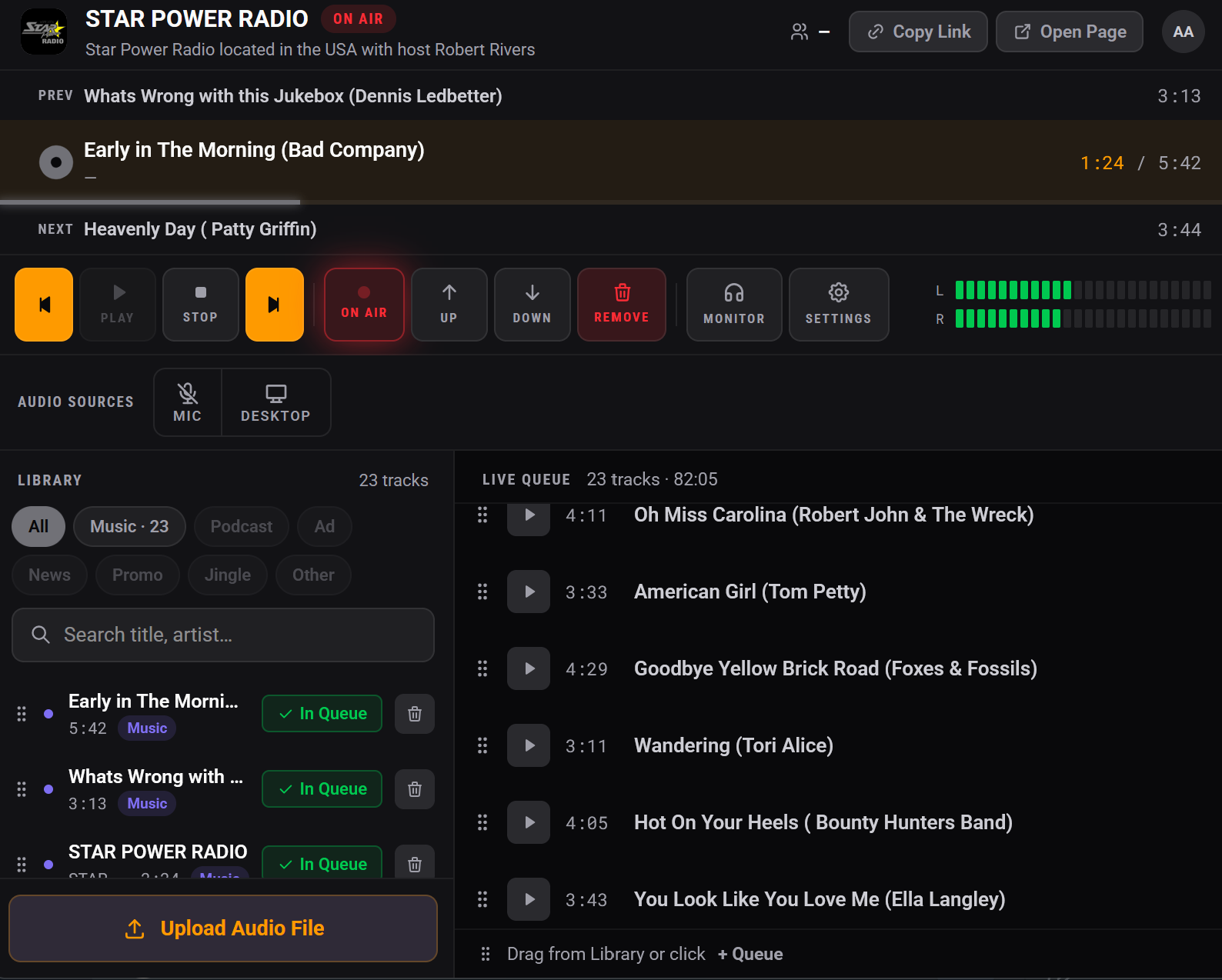
Build your Live Queue
Select content from your Media Library and add it to the Live Queue.
- Drag media into the queue
- Use + Queue to add items
- See track count and total running time
- Drag tracks into a new order
- Play an individual item immediately when required
Go live
Check
Review your upcoming playlist and test your microphone.
ON AIR
Turn ON AIR on when you're ready for listeners to hear the station.
Play
Press Play and your Live Queue begins.
Present
Use MIC when speaking and Desktop when you want compatible device audio.
Monitor
Listen to the outgoing broadcast, watch levels and manage the queue throughout your show.
Your audience gets its own station experience
YOUR STUDIO
You control the broadcast, media, microphone, Desktop audio and Live Queue.
YOUR LISTENER PAGE
Your audience tunes in through your dedicated KryKey Radio station page.
Your station can expand
Use Studio Admin to manage station details and available upgrades. Additional Media Library storage is available in 1GB lots for $3.99 USD/month.
More optional KryKey Radio upgrades will be added as they become available.
Support and User Guide
KryKey Radio provides support, and the detailed Studio User Guide explains the main Studio controls and workflows.
Ready to build your radio station?
Plans start from $9.99 USD/month.